Keep your online account secure with email verification
Your online account helps you manage your home at a time that works for you. Turning on email verification adds an extra layer of security to help keep your personal information safe. Here’s how it works and how to switch it on.
Multi-factor authentication, or MFA, is an extra check to help confirm it’s really you signing in. You might also hear it called two-step verification.
In your online account, this is called Login verification by email. When you’re asked to verify your sign-in, we’ll send a code to your email address. You’ll enter this code as an extra step, alongside your password.
Your online account contains personal information about you and your home. Email verification makes it harder for someone else to access it, even if they know your password, because they’ll also need the code sent to your inbox.
It’s an extra layer of protection, not a replacement for a strong, unique password. Keep your email account secure too, and don’t share your verification codes with anyone.
Before you start, make sure you can access the email address shown in your online account.
Sign in to your online account and go to your Profile page showing Update your details
Check your Email address is correct. If it needs updating, select Edit next to it and follow the instructions on screen.
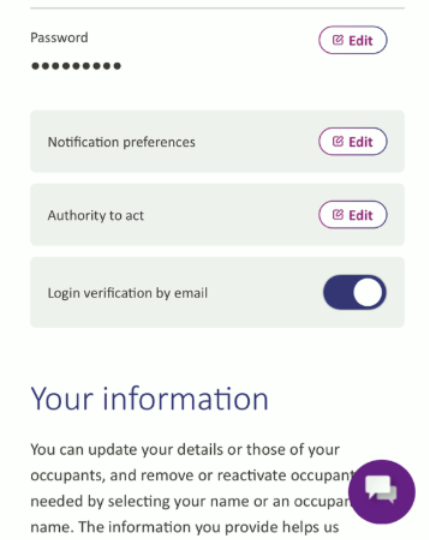
Find Login verification by email, below Authority to act
Select the switch to turn it on
Sign in to your online account as you usually would using your usual log in details.
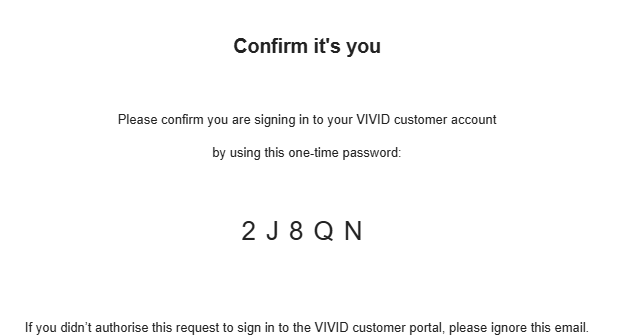
When you see Enter code sent to your email address, keeping this page open, look in your email inbox to find the code. It will look like this:
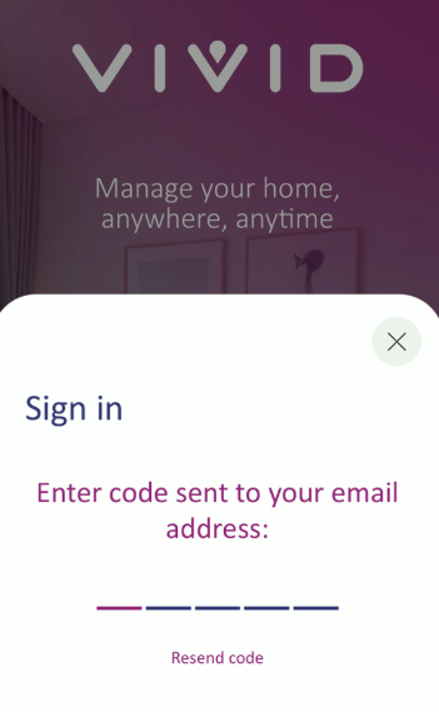
Return to the sign-in screen and enter the code in the spaces provided. Follow any instructions on screen to finish signing in.
Check your junk or spam folder. If you still can’t find the email, select Resend code on the sign-in screen to ask for another one.


